
Demo Trail User Simulation -- Simple Tucson Mountain Park Network
View the TMP model simulation running in Mpeg format (6.86 MB)
To run TopoFusion's trail simulator follow these steps:
If you would like to run a trail simulation on your own data, see Running your own Simulations.
For users of the full version of TopoFusion you can:
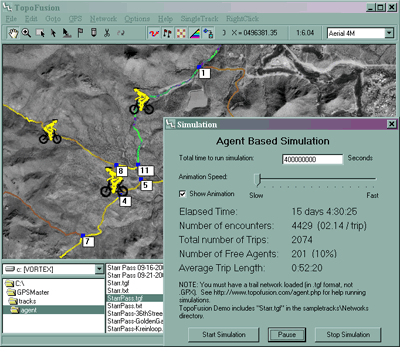
Note: the trail simulator is no longer available in the public version of TopoFusion. If you are interested, please get in touch with us.
View the TMP model simulation running in Mpeg format (6.86 MB)
To run TopoFusion's trail simulator follow these steps:
- Download The current TopoFusion Demo.
- Install TopoFusion.
- Using the directory viewer, navigate to the "TopoFusion\sample tracks\Networks" directory.
- Double click on "StarrPass-Simulation.gpx" in the directory viewer.
- Remove all active files from the file view window. Ensure StarrPass-Simulation is the only file that is loaded and active.
- Select the menu option Network->Trail Simulation
- Using the form that pops up, start the simulation.
If you would like to run a trail simulation on your own data, see Running your own Simulations.
For users of the full version of TopoFusion you can:
- Download Starr Pass Network file.
- If you'd like non-random use data, Download auxiliary network information file. (OPTIONAL).
- Place the two files (StarrPass-Simulation.tgf and StarrPass-Simulation.txt) in the same directory.
- Follow the above steps on the downloaded file(s).